
Free plugin · Dox POS 0.41 or newer
The Sales tab decides what the register offers when you record a sale: the channels a sale comes in through, the payment methods, and whether your messages to the customer go by text message or by WhatsApp.
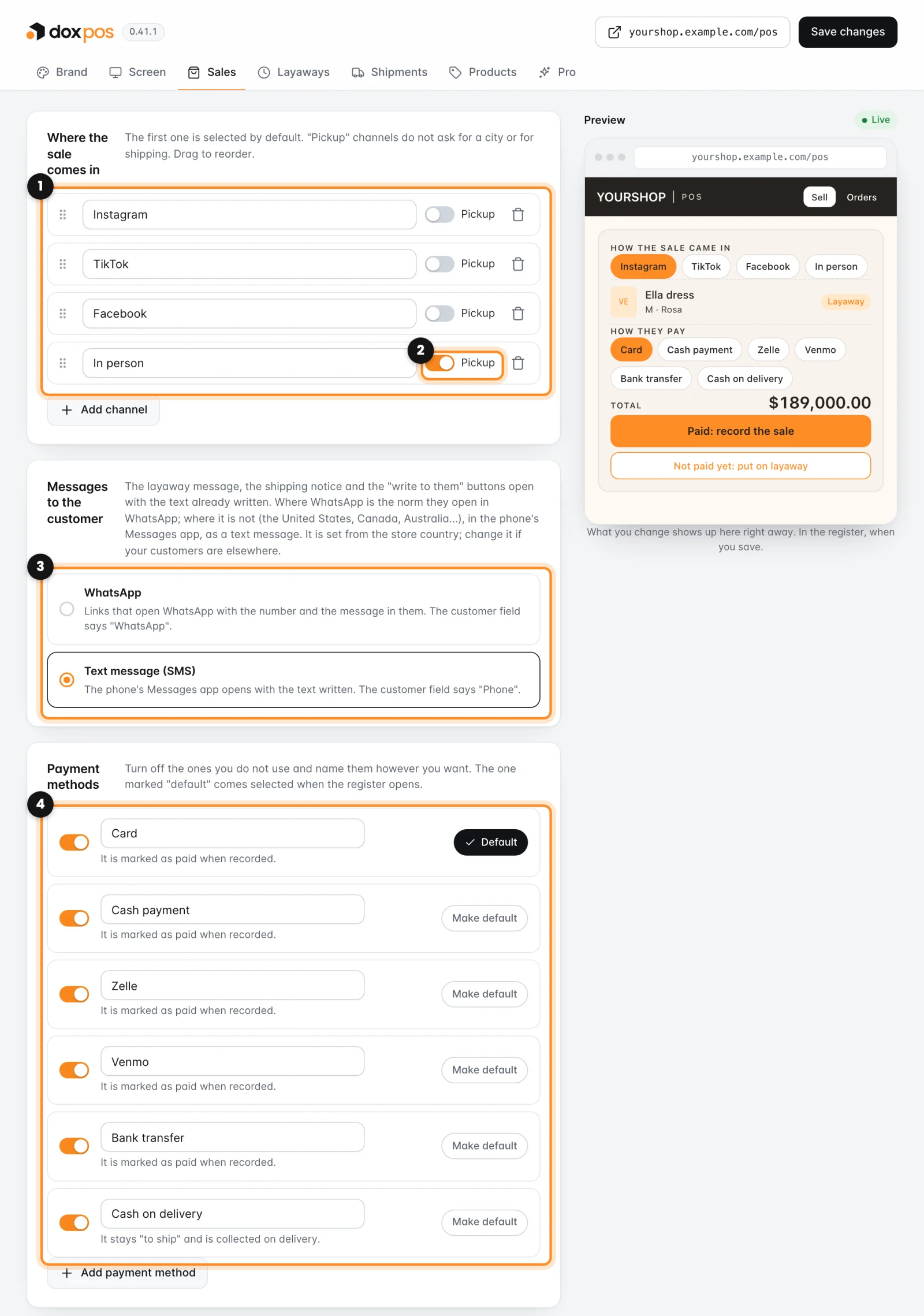
Everything starts with the defaults of your store’s country, the one in WooCommerce › Settings › General. A store in the United States starts with Instagram, TikTok, Facebook and In person as channels, text messages, and Zelle and Venmo among the payment methods.
Where the sale comes in
- Go to WooCommerce › Dox POS and open the Sales tab.
- In Where the sale comes in (1), rename a channel in its field, remove it with the trash can, or click Add channel.
- Turn on Pickup (2) for the channels where the product is handed over in person: those sales don’t ask for a city or for shipping.
- Drag the rows to put them in order. The first one comes selected in the register.
Messages to the customer
The layaway message, the shipping notice and the buttons to write to a customer open with the text already written. In Messages to the customer (3) choose how:
- Text message (SMS): the phone’s Messages app opens with the text written, and the customer field in the sale says Phone. This is where a US store starts.
- WhatsApp: WhatsApp opens with the number and the message in it, and the customer field says WhatsApp. Choose it if your customers write to you there.
Payment methods
A US store starts with Card, Cash payment, Zelle, Venmo, Bank transfer and Cash on delivery.
- In Payment methods (4), turn off the ones you don’t take with their switch, and rename any of them in its field.
- Click Make default on the one that should come selected when the register opens. It then says Default.
- Take another one, like a second Zelle account? Click Add payment method and write its name. Your own methods count as paid when the sale is recorded.
- Click Save changes. The register shows the new channels and methods the next time it opens.
Cash on delivery is the only method that is not paid when you record the sale: the order stays To ship and is collected when it is delivered. Every other method marks the sale as paid.
- The register needs at least one channel and one payment method. If you remove every channel, the defaults come back; if you turn off every method, they are all turned back on.
- If the tab says WooCommerce is not managing stock, turn on “Manage stock” in WooCommerce › Settings › Products › Inventory. Until then, sales don’t lower the stock and layaways don’t hold anything.
- The carriers and the shipping message are in the Shipments tab, and the layaway deadline and message in Layaways.
Next: Put products on layaway