
How can we help
with your hosting?
Email, domains, invoices and backups, step by step and with screenshots of your cPanel and client area.
Browse by topic
Every hosting guide, grouped by what you want to do.
Quick answers
What our hosting clients ask most, answered in two lines.
How do I create an email account?
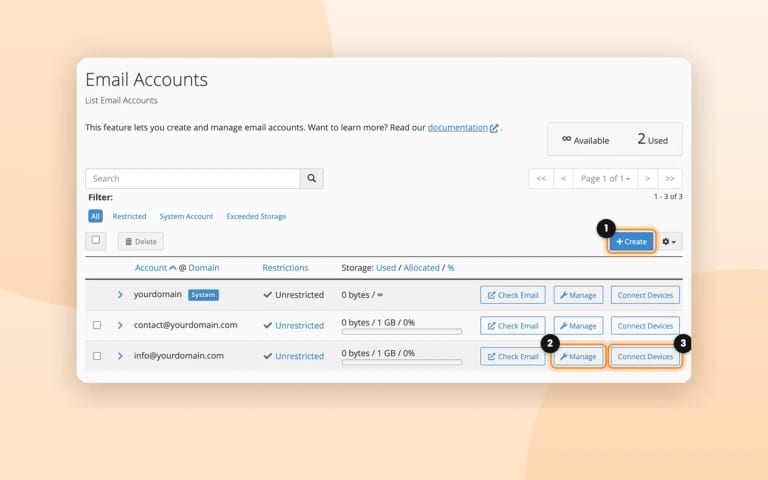
In cPanel, Email Accounts › + Create: write the name before the @ and a password. It works right away.
Create an email accountWhat are my email settings?
Server mail.yourdomain.com, IMAP 993 and SMTP 465 with SSL, and your full address as username.
My email is filling up the hosting
With IMAP every email stays on the server. If you read it on one computer only, switch Outlook to POP so it takes the email to that computer.
Outlook from IMAP to POPI forgot a mailbox password
Set a new one in cPanel, Email Accounts › Manage, and put it on every device that uses the mailbox.
Create an email accountGmail stopped checking my email?
Google is removing Check mail from other accounts (it stops in January 2027). Read your email in Webmail, at webmail.yourdomain.com, or add it to the Gmail app by IMAP.
An email didn’t arrive?
Look in the spam folder of your mailbox first. To always accept a sender, add it to the whitelist in Spam Filters.
Spam and bouncesBilling
Invoices and your planWhen does the invoice arrive?
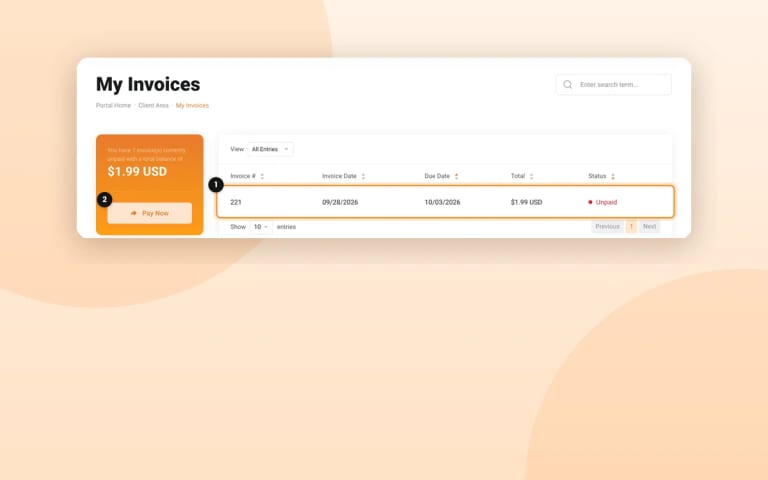
14 days before the due date for the hosting (30 for a domain). A saved card is charged on the due date.
Invoices and paymentsWhat if I don’t pay?
The hosting is suspended 5 days after the due date, and the account is deleted after 30.
Invoices and paymentsCan I cancel?
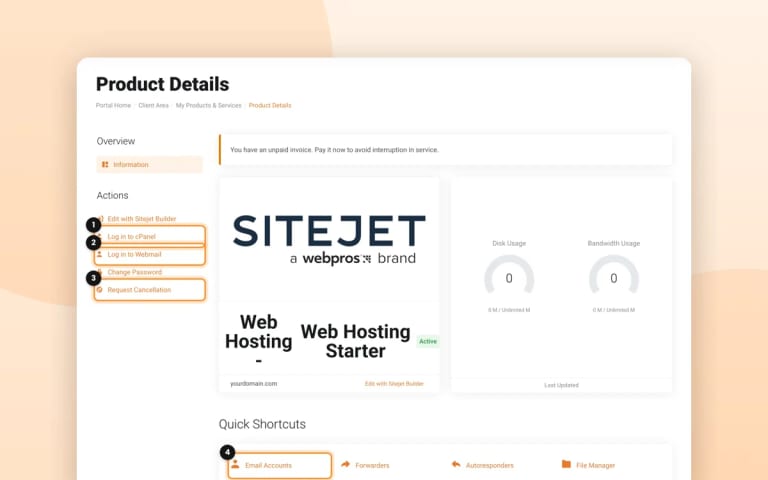
Yes, any time, in Services › your plan › Request Cancellation or by email. It stays active until the end of the paid period. First purchase: full refund within 30 days (annual) or 48 hours (monthly).
Invoices and paymentsHow much room does my plan have?
cPanel shows it in Statistics: what you use and your plan’s limit. The numbers of each plan are on doxstudio.com.
What’s includedDomains, moving and files
Your domain, your site and your copiesWill you move my website from another host?
Yes, for free. Open a ticket in Migraciones y Traslados with your website, your old hosting and where your domain is registered.
Move your websiteWhat are my FTP details?
Host us1.doxstudio.com, port 21, Require explicit FTP over TLS, and your full FTP user with its password.
What are your nameservers?
ns1.doxstudio.com and ns2.doxstudio.com. Domains we register already use them.
Google asks me for a TXT record
Add it in cPanel, Zone Editor › Manage › + Add Record, exactly as Google shows it.
Edit your DNSDo you keep backups?
Yes: the whole account every day, and the last 7 days, outside the server.
BackupsI deleted something by mistake
Bring it back from JetBackup 5 in cPanel, or open a ticket with the date and what to recover.
BackupsDidn’t find it?
Open a ticket from your client area, or write to support@doxstudio.com. We answer Monday to Friday, 9 a.m. to 5 p.m. Eastern Time.
So we can fix it on the first answer
- Your domainAnd the exact email address, if it’s about email.
- What happenedWith the exact error message, or the bounce forwarded.
- When, and a screenshotRoughly when it happened, and what you see.
Need more room for your website?
Websites, email accounts, disk and traffic of each plan, always up to date on doxstudio.com.