
Dox Studio hosting · all plans
Every Dox Studio hosting plan comes with the same tools: cPanel, email on your own domain, a free SSL certificate and a daily backup. What changes from one plan to another is how much room you get. This guide tells you what you always have and where to see your own limits.
What every plan includes
- cPanel, the control panel of your hosting: email accounts, domains, DNS, files and backups.
- Email on your domain (you@yourdomain.com), with webmail and a spam filter.
- A free SSL certificate (the padlock of
https), issued and renewed on its own. - A backup every day of the whole account, kept outside the server. See Backups: what we keep and how to restore.
- LiteSpeed with LiteSpeed Cache, so WordPress sites load fast.
- Virus and attack protection on the server (Imunify360), watching the files and the logins.
- Essentials Care: we keep your WordPress updated and secure, and make small changes to your site each month. What it covers is on the web maintenance page.
The plans and their numbers
How many websites and email accounts, how much disk and traffic each plan has, and its price, are on the plans pages of doxstudio.com. They are always up to date there:
- Web Hosting: Starter, Business and Pro, for most websites.
- Performance Hosting: Boost, Growth and Elite, with more power for online stores.
- Semi Dedicated Hosting: Prime, Advanced and Titan, for sites with a lot of traffic.
You can pay each plan monthly or yearly.
See your limits and what you use
- Open cPanel from your client area. See Your client area.
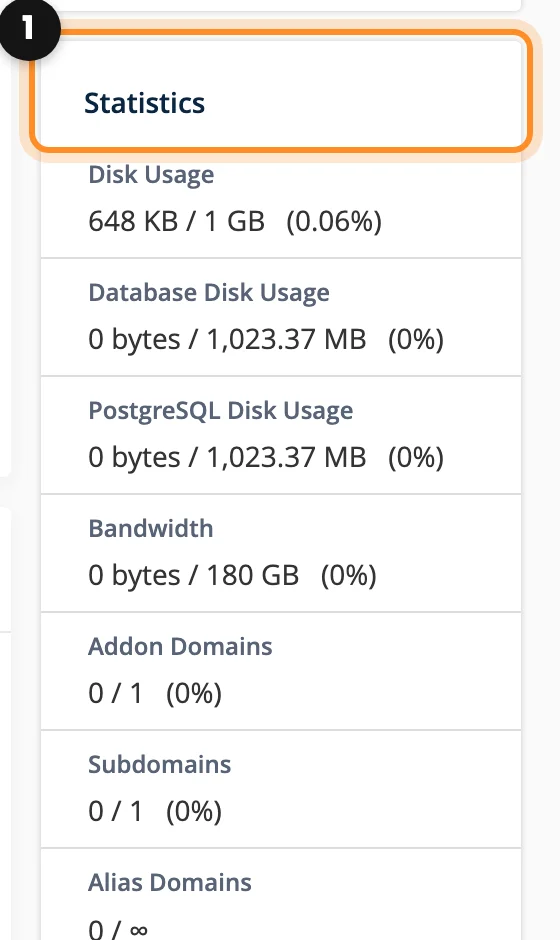
- On the right of the first page, find the Statistics box (1). On the phone it is further down.
- Each line shows what you use and the limit of your plan, for example Disk Usage, Bandwidth (the monthly traffic) and Addon Domains (the extra websites).
Time to move up? If the disk is almost full, or the site gets slow when many people visit it, a bigger plan helps. Open a ticket and we’ll tell you which one fits and change it for you.
Good to know
- The server is in Virginia, in the United States.
- Each domain can send up to 200 emails per hour. It’s for everyday email, not for newsletters: for those, use an email marketing service.
Next: Your client area: log in, see your services and open cPanel