
Dox POS Pro · 0.32 or newer
Some website customers get as far as paying and stop. The Pro shows each of those almost-sales under Today with the message ready to send, and emails the customer a reminder on its own. Whatever gets paid after a reminder counts as recovered.
The three cases
- An order that did not pay. The customer placed it but the payment is pending or was declined. She gets an email with the Pay my order button 2 hours later, and a second one after 24 hours if it is still unpaid.
- An order WooCommerce cancelled. WooCommerce cancels an unpaid order on its own after the minutes set in WooCommerce › Settings › Products › Inventory (60 to start with). The reminder link reopens it by itself and takes her straight to pay.
- A cart that never became an order. The checkout saves the cart as soon as she types her email or phone number. After 60 minutes with no order it counts as abandoned, and 3 hours later she gets the Finish my purchase email, which puts the same products back in her cart.
Follow them under Today
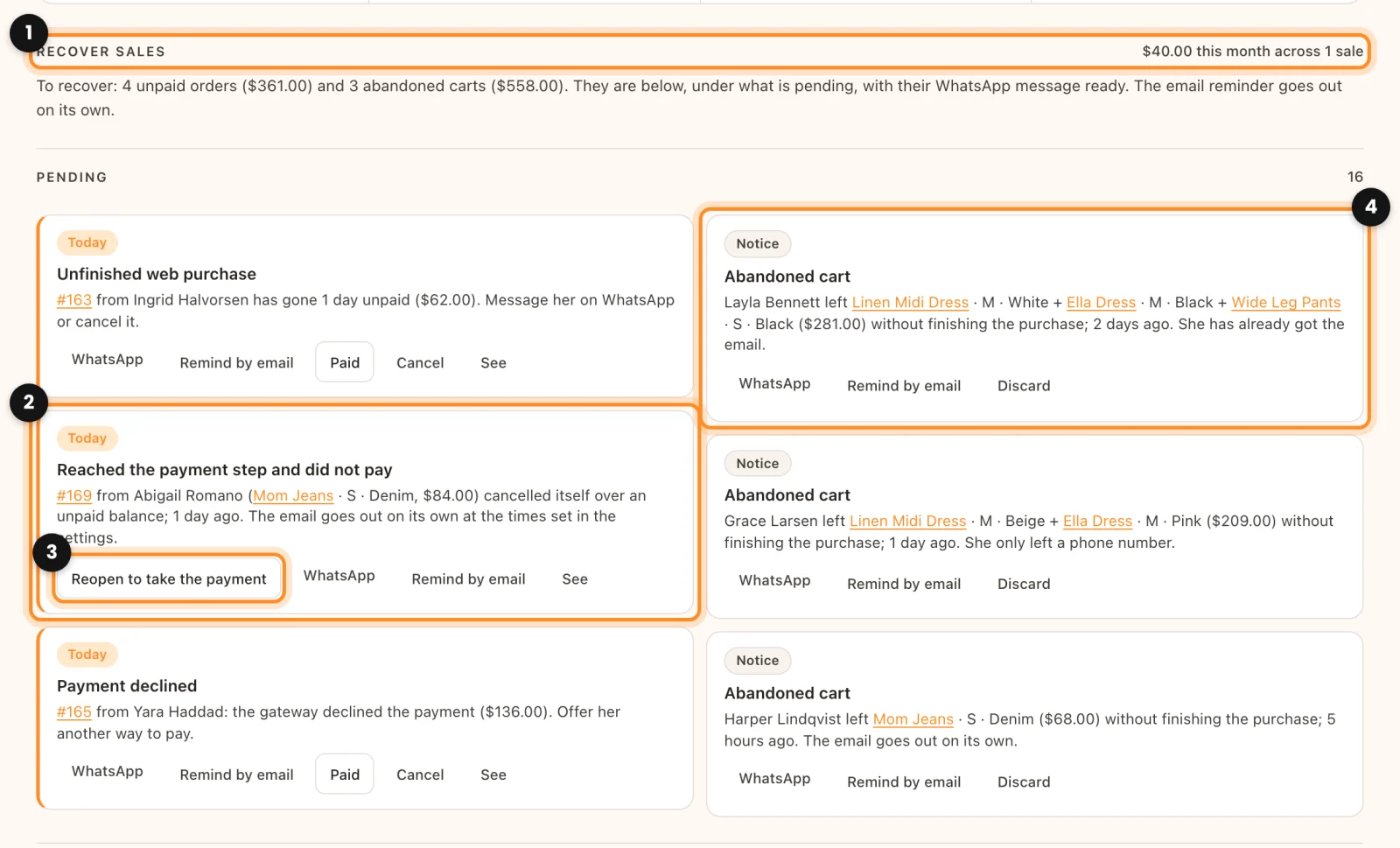
- Open Assistant › Today. The Recover sales group (1) says what came back this month, for example “$184 this month across 2 sales”, and what is left to recover from the last 7 days.
- Under Pending, a cancelled order shows as Reached the payment step and did not pay (2). Tap Reopen to take the payment (3) and confirm: it goes back to pending payment, its products are held again and the payment link works once more.
- An Abandoned cart (4) has WhatsApp, Remind by email (sends the email right away) and Discard. Unpaid orders show as Unfinished web purchase or Payment declined, also with Remind by email.
WhatsApp opens the message already written with the link to pay; in a store set to text messages, it opens Messages. Nothing is ever sent by WhatsApp or text on its own: you send it. When a recovered order is paid, it gets the note “Sale recovered by Dox POS” with how it came back.
The settings
In WooCommerce › Dox POS › Assistant, card Recover sales:
- Send email reminders for unpaid orders, with First email after (2 hours) and Second email after (24 hours; 0 means no second email).
- Save checkout carts and remind customers by email, with Abandoned after (60 minutes) and Cart email after (3 hours).
- Coupon in the email: the code of a coupon that already exists in WooCommerce. Empty, the email goes without one. A reminder alone is usually enough, and a coupon gives away margin.
- Notice under the checkout email field: it tells the customer her email is being saved. It starts as “If you do not finish your purchase, we will remind you about your cart by email.”
- WhatsApp for an unpaid order and WhatsApp for an abandoned cart: the messages behind the button, with
{name},{order},{items},{total},{store}and{link}. They must keep{link}, or the customer has nowhere to pay.
Limits: the recovery emails use your store’s WooCommerce email design and go out at most 100 a day, with one cart email per address per week. Saved carts (name, email, phone and products) stay in your shop’s database and are deleted after 30 days. None of this needs a licence or uses questions.