
Dox POS Pro · 0.32 or newer
The Assistant tab of the register opens on Today: how yesterday and the week went, which orders need something from you, what is running out and a few tips. Only administrators and shop managers see it.
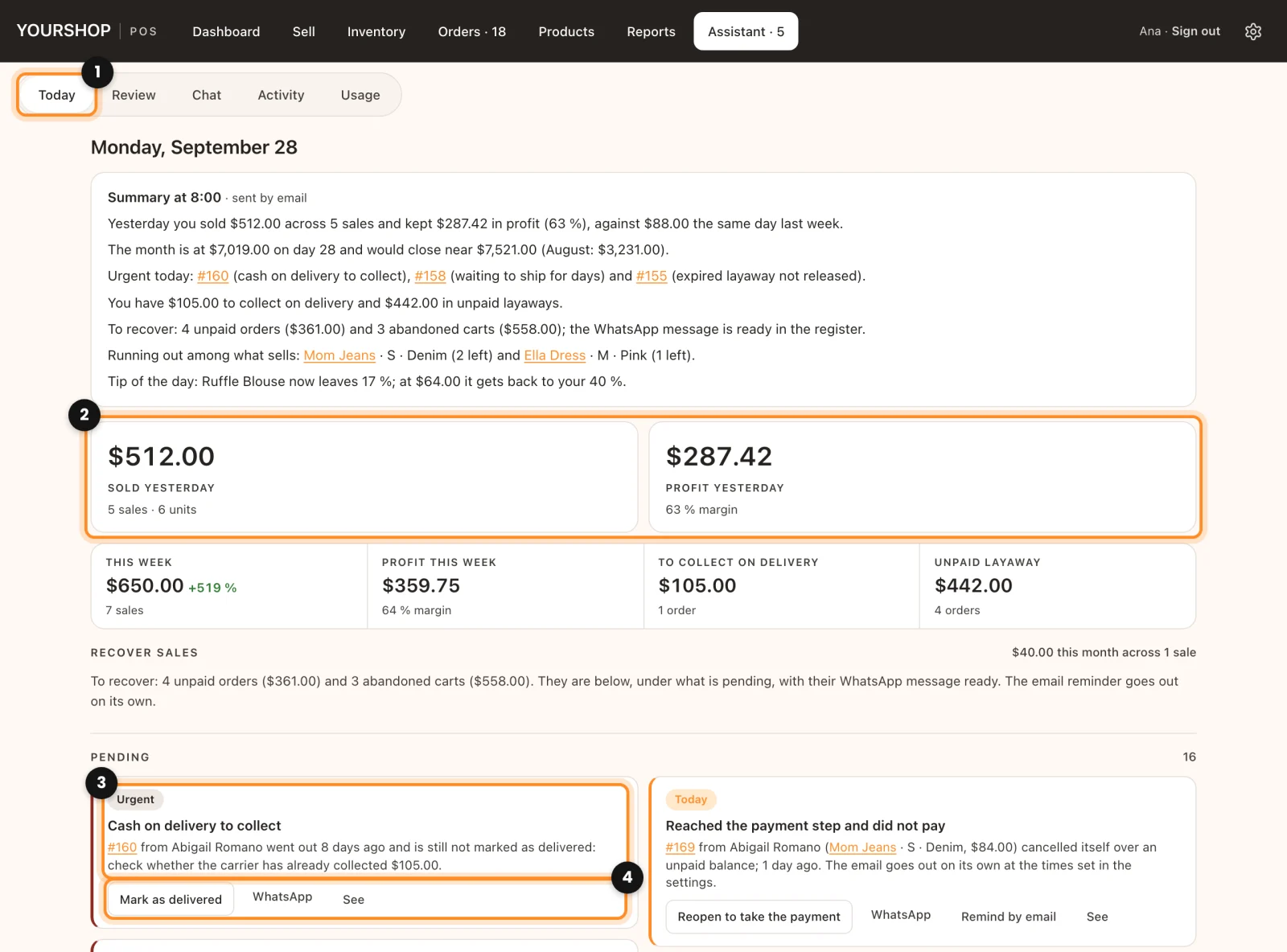
Open Today
- In the register, tap Assistant. When something is urgent, the tab carries the count, for example Assistant · 2. It opens on Today (1).
- At the top you see Sold yesterday and, with costs turned on, Profit yesterday (2). Below them: This week (with the change against last week at the same point), Profit this week, To collect on delivery and Unpaid layaway.
- Tap a figure to open where it comes from: yesterday’s sales or the week in Reports, and the money to collect in Orders.
What is pending
Under Pending, each notice names the order, the customer and what is wrong, with a tag: Urgent, Today or Notice (3). The buttons under the text (4) work on that order without leaving the screen: Mark as shipped, Mark as delivered, Paid, Release, Cancel, WhatsApp and See. Paid, Release and Cancel ask you to confirm first. In a store set to text messages, the WhatsApp button opens Messages with the text written.
This is what the assistant watches:
- Expired layaway not released and Layaway about to expire (less than six hours left).
- Unfinished web purchase, Payment to confirm and Payment declined: website orders that have not paid.
- Waiting to ship for days: paid, or cash on delivery, and still not shipped.
- Cash on delivery to collect and Shipped but not marked delivered.
- Shipped with no tracking number, Order with no phone number, Order at zero and Possible duplicate order (same phone number and same total, close in time).
Website orders that did not pay and abandoned carts show up here too, with their own buttons: Recover sales and abandoned carts.
What is running out and the tips
- What sells is running out: products that sold in the last 30 days and have two units or fewer left. Tap a name to open the product.
- Forecast: shows up once the shop has enough sales history. It has its own guide: The forecast.
- Tips: short advice with the figure behind it, for example what to restock or which hidden products have stock. See takes you to what the tip talks about, and Refresh works them out again. The heading says whether they are by rules or written by the assistant.
What it uses: every figure on Today comes from your own sales and uses nothing, however many times you open it. The only part that uses a question from your plan is the tips, which the assistant writes at most twice a day. With no up-to-date licence and no OpenAI key of your own, Today works the same, with the tips by rules.
Change when it warns you
In WordPress, go to WooCommerce › Dox POS and open the Assistant tab (with other Dox Studio plugins, it is under Dox Plugins › POS). In When it warns you:
- Waiting to ship for: 2 days to start with.
- Shipped but not delivered for: 6 days. With cash on delivery, that is money still to collect, so it warns as urgent.
- Web payment not confirmed: 24 hours.
- Running out when there are: 2 or fewer left. It only looks at what sold in the last 30 days.
Layaways warn on their own when they expire or have less than six hours left. Click Save changes when you are done.
Next: The review of your shop